
Strategy Isn’t the Problem. Architecture Is.

Most organizations do not suffer from a lack of strategy.
They suffer from a lack of structure.
In my work with founders, leadership teams, and facilitators, I often see incredibly intelligent people trying to solve complexity by adding more ideas, more initiatives, or more energy.
But growth does not respond well to intensity.
It responds to architecture.
When growth feels inconsistent, overwhelming, or overly dependent on one person’s energy, the issue is rarely motivation. It is almost always structural.
This is where the Growth Architecture Map becomes useful.
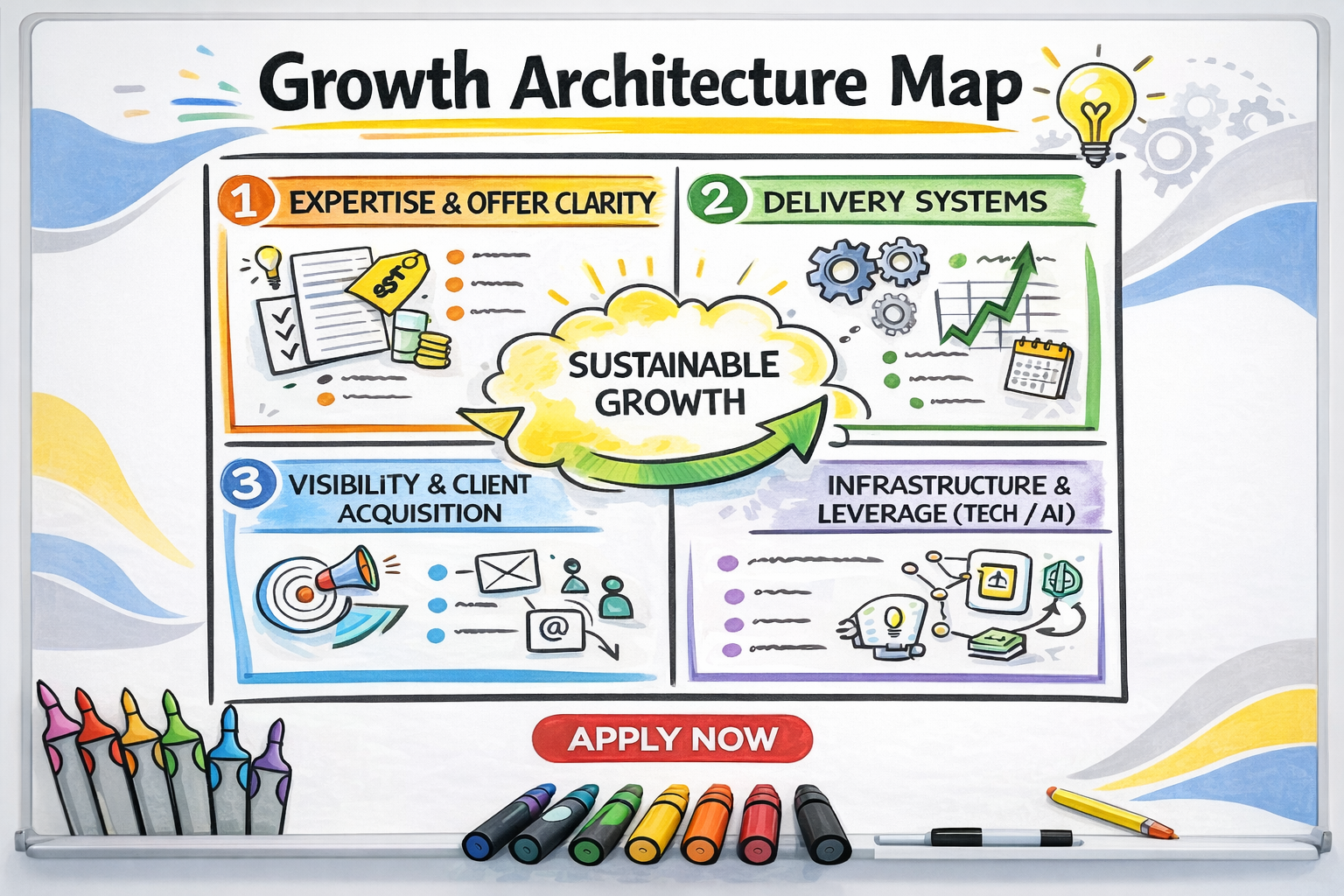
The Four Systems Behind Sustainable Growth
Sustainable growth is not one system. It is four systems working together.
When one is underdeveloped, the entire structure feels unstable.
1. Expertise & Offer Clarity
This is the foundation.
What problem do you solve?
Who is it for?
What transformation do you create?
Clarity here reduces friction everywhere else.
Organizations that struggle with visibility often a...
Leading From the Front of the Room in an Age of Screens and AI

We are living in a time when it is easier than ever to hide.
Hide behind a screen.
Hide behind slides.
Hide behind data, dashboards, and now AI-generated answers.
We can prepare endlessly. We can optimize language. We can simulate outcomes. We can arrive with something polished and impressive.
And yet, something essential is being lost.
There is still a deep and growing need for leaders who are willing to step to the front of the room with very little in their hands. A few post-its. A marker. An empty wall. And the courage to say, “I don’t know yet. Let’s figure this out together.”
That kind of leadership cannot be automated.
Presence Over Performance
Leading from the front of the room today is not about having the best answer. It is about being fully present.
It looks like standing where everyone can see you and resisting the urge to rush toward certainty. It means listening before shaping. Holding space before directing. Allowing the room to breathe before asking it to move.
...The Biggest Trend I See With Professionals Who Add Visual Facilitation to Their Work

(Spoiler: They’re the Ones Getting Promoted)
Why visual thinking is becoming a fast track to leadership growth inside organizations.
After two decades of working inside corporate environments — supporting teams at Google, Disney, Mars, NASA, Coca-Cola, and dozens more — I’ve noticed a pattern that’s too consistent to ignore:
The people who learn Visual Facilitation are often the ones who get promoted.
It’s not because they become “the person who can draw.”
It’s because they become the person who can do something far more valuable:
They create clarity.
They elevate conversations.
They help teams move forward faster.
And in today’s workplace, clarity is leadership.
Here’s why Visual Facilitation has become one of the most powerful accelerators for professional advancement.
1️⃣ They Become the Person Who Can Simplify Complexity
Every organization is dealing with:
-
competing priorities
-
rapid change
-
misalignment
-
information overload
Most meetings leave peo...
3 Ways Visuals Transform Team Alignment

Why Visual Thinking Is Becoming a Critical Skill for Leaders in 2026
If there’s one thing every leader is trying to solve right now, it’s alignment.
Hybrid work, shifting priorities, rapid change, and information overload mean teams are often working hard — but not always in the same direction.
Traditional methods of communication aren’t keeping up.
Long meetings, complex slide decks, and endless emails rarely create true clarity.
This is why organizations are turning to visual thinking as a strategic advantage.
Visuals simplify complexity, accelerate understanding, and help teams see the work in front of them — literally.
Here are the three most powerful ways visuals transform alignment inside teams and organizations:
1️⃣ Visuals Create a Shared Understanding Faster Than Words
In most meetings, people hear the same information…
but walk away with different interpretations.
Visuals solve that by making the strategy, the plan, or the problem visible in real time.
When a leader...
Why Visual Thinking Is a Must-Have Leadership Skill in 2026

The skill that transforms alignment, communication, and decision-making in the modern workplace.
As we move into 2026, one thing is becoming clear across every industry:
leaders are expected to create clarity in environments that are more complex than ever before.
Hybrid teams, information overload, rapid change, shifting priorities, and rising expectations mean that traditional communication methods simply aren’t enough.
This is why the most effective leaders are embracing a new superpower:
Visual Thinking.
Visual thinking isn’t about drawing pretty pictures.
It’s about using simple visuals — frameworks, diagrams, icons, and mapping — to help teams think better, communicate better, and act faster.
And in 2026, it’s quickly becoming an essential leadership capability.
1. Leaders Must Communicate With More Clarity Than Ever
The pace of work has doubled. The attention span has not.
When leaders rely solely on long emails, dense slides, or verbal explanations, things get lost — ...
The Rising Demand for Visual Facilitation in 2026

Why Leaders, Coaches, and Teams Are Embracing Visual Thinking as a Strategic Advantage
In a world overflowing with information, attention has become the new currency. Teams are overwhelmed, meetings are overloaded, and strategy often gets lost in endless conversations and competing priorities.
This is exactly why Visual Facilitation is no longer a “nice skill to have.”
It has become a critical capability for leaders, coaches, trainers, and organizations that want to create clarity, alignment, and momentum in 2026 and beyond.
What Is Visual Facilitation?
Visual Facilitation is the practice of using drawings, frameworks, symbols, and visual mapping to help groups think more clearly, communicate more effectively, and collaborate more meaningfully.
It’s not about being an artist.
It’s about turning complex ideas into simple, memorable visuals that accelerate understanding and decision-making.
In today’s fast-moving work environment, this skill is now indispensable.
1. Teams Are Str...
Setting Up Your Own Virtual Training Workpace
Discover simple tips to elevate your virtual space using your iPad, camera, lighting, and a few creative touches. In this post, Diane shares a 5-minute highlight from her recent community call to help you feel confident and shine online.
Whether you’re teaching, presenting, or creating online, the way you show up in your virtual space matters. It’s not about being fancy—it’s about feeling confident, clear, and aligned with your brand.
Last week, we hosted a Community Call all about Setting Up Your Virtual Space, and I wanted to share this 5-minute highlight clip with you. In it, I walk through some of my favorite gear and tips for creating a setup that feels professional but personal.
Here’s what we covered in the full session:
✨ iPad Setup
I shared how I use my iPad for live drawing, screen sharing, and presentations—plus my go-to apps and stylus for creative sessions.
📸 Camera Angles
Whether you're using a built-in webcam or an external one, angle matters. We talked about si...
When You Need to Recharge Your Battery
What Do You Do When You Need to Recharge?
A Simple Visual Activity for Self-Care & Team Connection
In our latest community conversation, I asked a powerful question:
“What do you do when you need to recharge?”
I collected responses and turned them into a visual—because sometimes, seeing it drawn out makes it all the more meaningful. In this quick 5-minute video, I walk you through the process I used and show you how to use this same activity for yourself or with your team.
Whether you’re feeling burnt out or just need a boost, this exercise is a creative and reflective way to build your Self-Care Transformation Toolkit. 🌿
🖊️ Want to Try It Yourself? Here’s How:
-
Draw a picture of yourself and a battery.
-
Make a list of the things that recharge you.
-
Add visual icons or doodles to bring your ideas to life.
This activity is perfect for personal reflection, team workshops, or even classroom settings. It’s a great reminder that we all recharge in different ways—an...
The Wheel of Life
The Wheel of Life: A Visual Coaching Tool for Realignment
The Wheel of Life is one of the first coaching tools I learned over 16 years ago—and it’s one I continue to come back to time and time again. Why? Because it’s simple, powerful, and incredibly insightful.
Contrary to popular belief, the goal isn’t to create a perfectly balanced wheel. The true purpose is to identify areas of life where you feel out-of-balance and bring awareness to where you might need more attention, care, or focus.
If you're a coach, facilitator, or team leader working with people who feel stuck or overwhelmed, the Wheel of Life offers a meaningful way to spark conversation and self-discovery.

How It Works
In this example, I used the ten life domains inspired by Michael Hyatt’s Full Focus Planner:
-
Intellectual
-
Social
-
Emotional
-
Vocational
-
Physical
-
Avocational (Hobbies/Leisure)
-
Marital
-
Financial
-
Spiritual
-
Parental
These categories represent a full vie...
Create Your Social Media Visual Plan with One Simple Icon
Feeling stuck on what to post? You’re not alone—and I’ve got a creative solution for you. In this mini-lesson, we’ll explore how to use the Mini Visual Mapping Cards to spark fresh content ideas and plan your next round of social media posts with clarity and ease.
One of my favorite templates is built around a single, powerful image: the phone icon. From this simple shape, you can map out an entire Social Media Visual Plan—whether you're creating for yourself, your team, or a client.

🖼️ How to Create Your Social Media Visual Map
Here’s a simple, five-step visual process to guide your planning session:
-
Start with a Phone Icon
Draw a phone shape in the center of your page to represent your digital presence. -
Divide into Sections
Split the screen into 3–6 sections, like content blocks or categories. -
Add Titles + Mini Icons
Label each section with a content type or theme. Add mini icons for visual clarity. -
Color in the Details
...
Use colors to distinguish between sec